Master Framer’s New Linking Features for SEO in 2025
Unlock the power of Framer’s June 2025 Linking UI update to boost SEO and accessibility. Learn how to use Rel attributes and A11Y features to enhance search rankings and user trust in this detailed Framer SEO 2025 guide.
I. Understanding Framer’s Redesigned Linking UI: What’s New in June 2025?
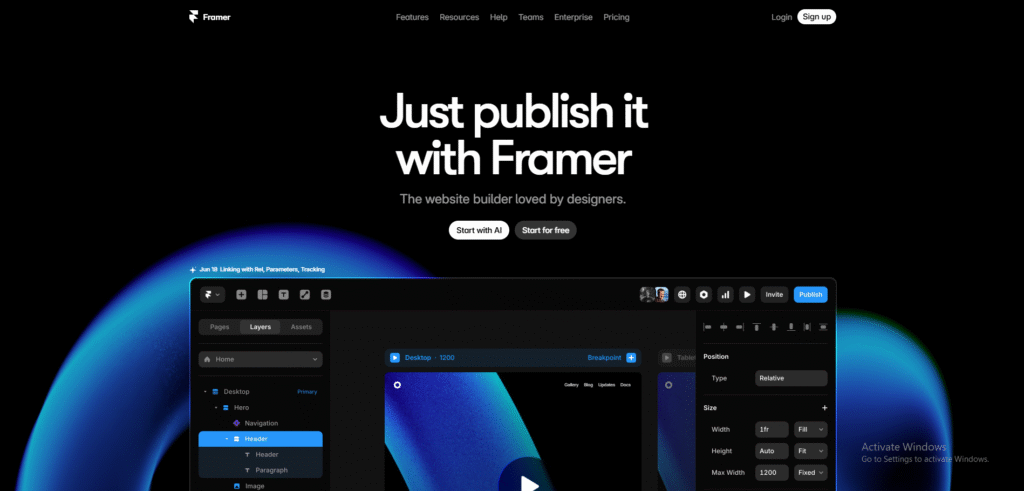
The June 2025 update to Framer’s Linking UI is a significant leap forward, introducing a user-friendly interface and advanced link management tools. At the core of this update are the new Rel attributes—No Follow, Sponsored, and UGC (User-Generated Content)—which allow you to define the relationship between your page and the linked content. These attributes are critical for SEO, as they provide search engines like Google with clear instructions on how to handle your links.
- No Follow: Signals to search engines not to pass SEO authority to the linked page. Use this for external links you don’t fully endorse, such as third-party sites or affiliate links, to avoid diluting your site’s SEO value.
- Sponsored: Marks links associated with paid promotions or advertisements, ensuring transparency and compliance with search engine guidelines.
- UGC: Identifies links in user-generated content, such as blog comments or forum posts, helping search engines differentiate between editorial and user-driven links.
Beyond Rel attributes, Framer has introduced Variable A11Y properties, including Aria Label, Aria Hidden, and Tab Index. These accessibility-focused features ensure that your links are navigable by screen readers and keyboard users, improving the user experience for people with disabilities. By combining SEO and accessibility, Framer aligns with Google’s emphasis on inclusive web design as a ranking factor in 2025.
Pro Tip
Use Framer’s preview mode to test how search engines interpret your Rel attributes. Tools like Google’s Rich Results Test can confirm that your links are correctly configured for SEO.
II. Step-by-Step Guide to Setting Rel Properties in Framer
Configuring Framer’s linking features is intuitive, even for beginners. Follow this detailed guide to optimize your links for SEO and privacy compliance:
- Open the Linking UI: In Framer’s design canvas, select the text, button, or element you want to link. Click the link icon in the properties panel to access the Linking UI.
- Insert the URL: Enter the destination URL. For external links, ensure the URL starts with
https://to maintain security. - Configure Rel Attributes: Expand the advanced settings to reveal Rel options. Choose No Follow for untrusted external links, Sponsored for paid promotions, or UGC for user-driven content. You can combine attributes (e.g., No Follow and Sponsored) for complex scenarios.
- Add Accessibility Properties: In the A11Y section, add an Aria Label to describe the link’s purpose for screen readers (e.g., “Visit our partner site”). Set a Tab Index to control keyboard navigation order, ensuring a logical flow for users.
- Check Privacy Compliance: For links collecting user data (e.g., affiliate tracking), verify compliance with regulations like GDPR or CCPA. Use Sponsored or No Follow to signal transparency.
- Test and Publish: Preview your site in Framer’s live mode to ensure links function as intended. Use SEO tools like Ahrefs or Moz to audit your link profile post-publishing.
By following these steps, you’ll create a link structure that enhances Framer SEO 2025 performance while meeting accessibility and privacy standards.
III. Why Framer’s Linking Features Matter for SEO and User Trust
Framer’s linking tools offer tangible benefits for web designers and marketers aiming to dominate search rankings and build user loyalty:
- Enhanced Search Engine Rankings: Properly configured Rel attributes help search engines prioritize high-quality links, reducing the risk of penalties for spammy link practices. This boosts your site’s authority and visibility.
- Increased User Trust: Transparent link labeling, such as marking Sponsored content, fosters credibility with visitors, encouraging longer sessions and higher engagement.
- Superior Accessibility: A11Y features like Aria Labels make your site inclusive, reducing bounce rates and improving metrics that influence SEO, such as time on page.
- Future-Proof Compliance: With search engines and regulators cracking down on misleading links, Framer’s tools ensure your site adheres to 2025’s stricter guidelines.
These benefits position Framer as a powerful ally for creating websites that perform well in both search results and user experience.
IV. Case Study: How a Marketer Skyrocketed Rankings with Framer
In early 2025, Sarah, a digital marketer for a sustainable fashion brand, used Framer’s June update to overhaul her client’s e-commerce site. Her goal was to improve organic traffic and accessibility. Sarah implemented No Follow attributes for affiliate links to third-party retailers, ensuring her site’s SEO authority remained intact. She also added Aria Labels to navigation menus and product links, making the site fully navigable for screen reader users.
Within three months, the site’s organic traffic increased by 25%, with a 15% reduction in bounce rates due to improved accessibility. Google’s Search Console reported a significant boost in click-through rates, attributing the success to better link clarity and user engagement. Sarah’s strategic use of Framer’s linking features demonstrates their real-world impact on Framer SEO 2025.
V. Framer vs. Webflow: How Do Their Linking Tools Compare?
Framer and Webflow are both leading web design platforms, but their linking capabilities differ significantly in 2025. Here’s a detailed comparison:
- Rel Attributes: Framer offers a streamlined interface for applying No Follow, Sponsored, and UGC attributes directly in the Linking UI. Webflow supports these attributes but requires manual code adjustments or third-party integrations, which can be time-consuming.
- Accessibility Features: Framer’s A11Y Variable support, including Aria Labels and Tab Index, is built into the design panel, making accessibility intuitive. Webflow’s accessibility tools are less integrated, often requiring custom HTML or JavaScript.
- User Experience: Framer’s visual editor simplifies link configuration for non-coders, while Webflow’s steeper learning curve may deter beginners.
- SEO Optimization: Framer’s focus on SEO-friendly defaults (e.g., secure
https://links) gives it an edge for marketers prioritizing Framer SEO 2025.
While Webflow excels in complex animations, Framer’s linking tools are better suited for SEO-driven and accessible web design in 2025.
VI. Watch Framer’s Linking UI in Action
Want to see Framer’s linking features in practice? Check out this video demo showcasing how to configure Rel attributes and A11Y properties:
For more details, explore Framer’s Official Changelog.
VII. Best Practices for Maximizing Framer’s Linking Features
To get the most out of Framer’s linking tools, follow these expert tips:
- Audit Existing Links: Before applying new Rel attributes, use tools like Screaming Frog to identify outdated or misconfigured links on your site.
- Prioritize Accessibility: Always include Aria Labels for links that aren’t self-explanatory (e.g., “Learn More” should describe the destination).
- Monitor Performance: Use Google Analytics to track how link changes impact traffic and engagement. Look for improvements in click-through rates and time on page.
- Stay Updated: Framer frequently releases updates. Subscribe to their newsletter or follow their changelog to stay informed about new SEO and A11Y features.
Conclusion
Framer’s June 2025 Linking UI update is a game-changer for web designers and marketers aiming to excel in SEO and accessibility. With advanced Rel attributes, robust A11Y features, and an intuitive interface, Framer empowers you to create websites that rank higher, engage users, and comply with modern web standards. By mastering Framer’s linking features, you’ll unlock new opportunities to enhance your site’s performance and stay ahead in the competitive landscape of Framer SEO 2025.
Ready to transform your web projects? Dive into Framer’s Linking UI today and start building SEO-optimized, accessible websites that stand out.