

TrendSpider – A Breakthrough Technical Analysis Tool for Professional Traders
In the ever-volatile financial market, equipping yourself with modern technical analysis tools is key to making accurate trading decisions. TrendSpider, combining artificial intelligence (AI) technology with automation features, has become an essential tool for professional traders.
I. Overview of TrendSpider
TrendSpider is an automated technical analysis platform that integrates powerful features such as price charts, technical indicators, and market scanning. What sets TrendSpider apart from traditional tools is its use of AI and automated algorithms to draw trend lines, identify price patterns, and mark support and resistance zones on charts. This eliminates subjectivity and errors during the analysis process.
II. Key Features
2.1. Multi-Timeframe Analysis
With TrendSpider, you can analyze price trends across multiple timeframes on a single chart. This provides a comprehensive view of market volatility, helping to identify effective entry and exit points.
2.2. Strategy Backtesting
Backtesting is a crucial step in optimizing trading strategies. TrendSpider offers an automated backtesting tool, allowing you to test the effectiveness of technical indicators and trading patterns based on historical data, helping you make more informed decisions.
2.3. Smart Trendlines – Automated Trend Lines
No need to manually draw trend lines; TrendSpider uses AI to automatically identify and draw them on the chart. This reduces subjectivity and helps you quickly grasp market trends.
2.4. Market Scanner
TrendSpider integrates a market scanner with hundreds of customizable indicators and conditions. You can easily search for stocks, cryptocurrencies, or other financial instruments based on your specific criteria, saving time and capturing trading opportunities efficiently.
2.5. Dynamic Alerts
TrendSpider allows you to set alerts based on price, indicators, or trend lines. These alerts update in real-time, helping you quickly react to significant market movements.
III. Pros and Cons of TrendSpider
3.1. Pros:
– Automation: Reduces manual operations, optimizing analysis time by automatically drawing trend lines, identifying price patterns, and generating automatic alerts.
– Accurate Analysis: Uses AI for chart analysis, eliminating subjectivity and enhancing accuracy.
– Multi-Timeframe Analysis: Enables simultaneous analysis across different timeframes, providing a comprehensive market overview.
– Backtesting: A powerful backtesting feature that allows you to test and optimize trading strategies using historical data.
– Market Scanner: Supports market filtering with hundreds of customizable indicators to effectively identify trading opportunities.
3.2. Cons:
– Cost: TrendSpider can be quite expensive, especially the **Platinum** plan, which might not be suitable for new traders or those who do not trade frequently.
– Complexity: The numerous advanced features can be challenging for beginners to grasp and use effectively.
– Limited Asset Integration: Although TrendSpider supports various assets like stocks and cryptocurrencies, it still has limitations with certain assets like derivatives.
IV. Detailed Analysis of TrendSpider’s Account Types
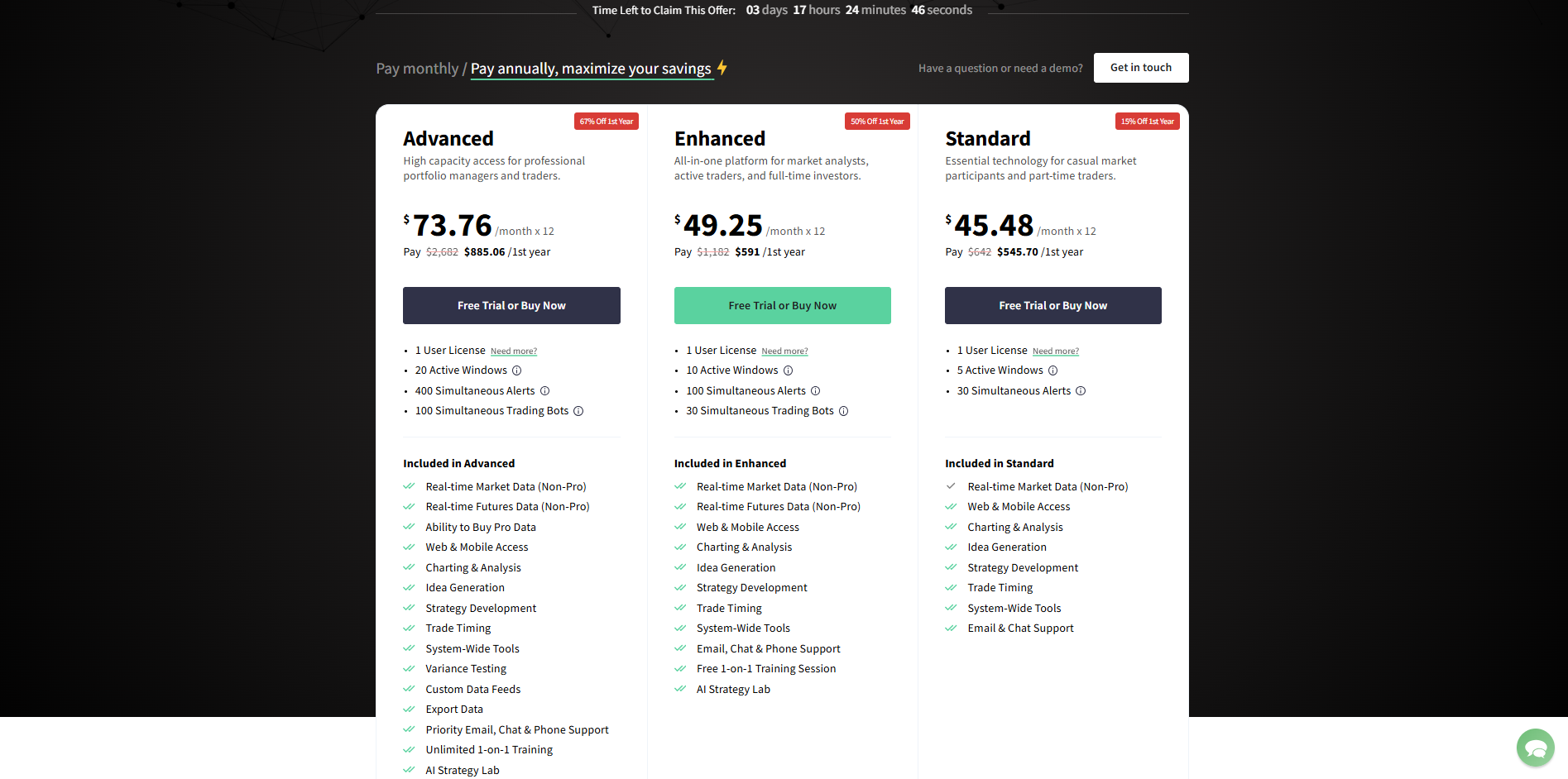
TrendSpider offers four different account types with varying prices and features, catering to a diverse range of traders. Here’s a detailed breakdown:
4.1. Essential Plan (Basic)
– Best for: Beginners who are just starting with trading and want to learn how to use basic technical analysis tools.
– Key Features:
– Unlimited Charts: Allows you to create and save an unlimited number of charts.
– Multi-Timeframe Analysis: Enables analysis across different timeframes for a more comprehensive market view.
– Basic Indicators: Provides a limited set of popular technical indicators to help you get started with your analysis.
– Limitations: Does not include advanced features like strategy backtesting, complex automated alerts, or customizable market scanning.
4.2. Elite Plan (Professional)
– Best for: Experienced traders and those who already have market analysis experience.
– Key Features:
– Strategy Backtesting: Allows you to test and analyze the effectiveness of trading strategies using historical data.
– Advanced Alerts: Provides alerts based on various criteria, helping you monitor the market more efficiently.
– Custom Market Scanner: Create custom filters to scan the market based on specific conditions.
– Advanced Indicators and Analysis Tools: Access more technical indicators, supporting a more detailed and diversified analysis.
– Pros: Ideal for traders looking to optimize and diversify their technical analysis strategies.
4.3. Elite+ Plan (Advanced)
– Best for: Professional investors and financial institutions that require real-time market data.
– Key Features:
– Real-Time Market Data Integration: Provides direct market data to help you monitor market changes quickly.
– Enhanced Automated Analysis: Allows analysis of complex price patterns and indicators, supporting in-depth trading strategies.
– Priority Customer Support: Offers priority support, ensuring you always have timely assistance.
– Pros: Delivers a comprehensive analysis toolset and real-time data to significantly enhance trading performance.
4.4. Platinum Plan (Highest Tier)
– Best for: High-level professional traders, investment funds, or financial institutions requiring comprehensive and high-performance analysis.
– Key Features:
– High-Efficiency Market Scanning: Quickly scans the market using complex filters and criteria, suitable for those who need fast-paced analysis.
– Real-Time Data: Provides real-time, second-by-second market data, allowing you to capture market changes instantly.
– Unlimited Automated Alerts: No limit on the number of alerts, helping you keep a close watch on the market at all times.
– Priority Support: Offers premium customer support, resolving issues promptly and efficiently.
– Pros: The Platinum plan provides the full suite of TrendSpider’s features, ideal for large-scale and professional investors requiring detailed and fast-paced analysis.
V. Advice for New Traders
If you are new to trading, here are some tips on how to use TrendSpider effectively:
– Start with the Essential Plan: Choose the **Essential** plan to familiarize yourself with basic features before upgrading to more advanced plans.
– Leverage Learning Resources: TrendSpider offers plenty of tutorials and learning videos; make use of them to understand how to utilize the tool.
– Focus on Basic Features: Initially, concentrate on basic functions like chart analysis, automated trend lines, and simple alerts. As you gain confidence, gradually explore more advanced features like backtesting or market scanning.
– Test Your Strategies: Use the backtesting feature to experiment with your strategies on historical data. This gives you a clearer picture of your strategy’s effectiveness before applying it to real trading.
VI. Conclusion
TrendSpider is a modern and flexible technical analysis tool that helps professional traders save time, minimize errors, and optimize trading strategies. With a combination of AI and automation, TrendSpider provides a comprehensive and accurate view of the market. While it may be costly, if you are a serious trader, TrendSpider is undoubtedly a reliable companion.